Ansys Meshing 2025 R1 Updates | Article
Explore key meshing updates in Ansys 2025 R1, including improved geometry faceting, watertight workflow refinements, thin volume meshing, and 2D meshing updates.
Ansys Meshing 2025 R1 Updates
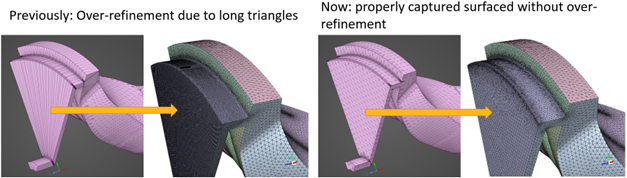
Optimize Geometry for Meshing Faceting
A new option for optimizing the geometry for meshing faceting is now available in Discovery. By enabling it from the settings you will be able to generate a mesh that is properly capturing all the surfaces without overrefinement.
Watertight Geometry Workflow
New local refinement region
The newly added local refinement region is Cylinder/Frustum. This removes the need to import CAD for a cylinder/frustum body of influence.
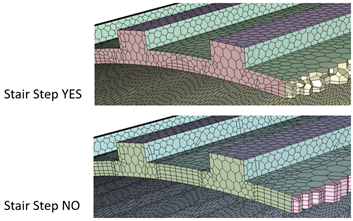
Enhancements for Thin Volume Meshing
The options for Thin Volume Meshing continue to expand and give better control to the user by adding a
Global Thin Volume Meshing Settings – control stair-stepping, aspect ratio, order of controls
Automatic Thin Meshing Controls (beta) – automatically detect and configure thin mesh regions and source/target selections.
Additional Quality Criteria in Improve Volume Mesh
The newly available criteria are – Minimum Cell Edge Length, Minimum Cell Face Area, Maximum Aspect Ratio, Maximum Cell Face Warp.
2D Meshing Workflow
For simple or test cases it is no longer required to use Ansys Meshing to obtain a mesh. Instead, you can use Fluent’s 2D meshing workflow. Although a relatively new feature, it proves to be a useful tool that received the following updates in Ansys 2025 R1:
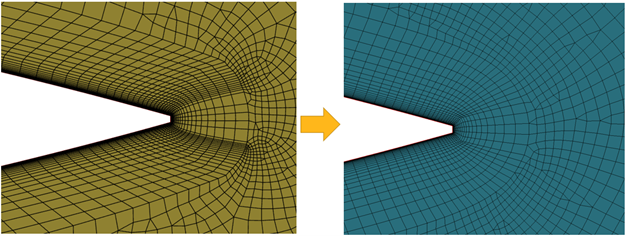
Quad Meh with 2D Multizone Meshing (beta)
Generation of pure quad mesh driven by edge sizing.
Compatible with boundary layers growth.
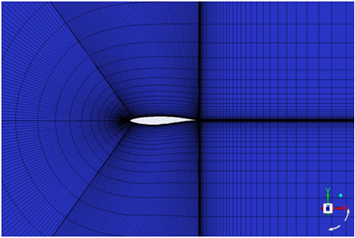
Improved Smoothing for Boundary Layers
Allows the creation of better-quality boundary layer cells
Fault tolerant meshing
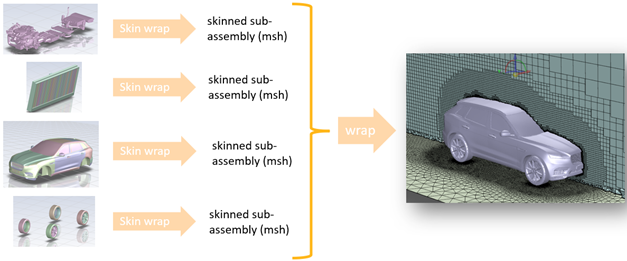
Skin Assemblies Sub-Workflow
For complex models it can be beneficial not to mesh the whole model at once. You can now split the geometry into sub-assemblies to gain better control over the discretization of the geometry (defeaturing, leakage filling, gap closing, etc.)